Showing posts with label Gadget. Show all posts

Tuesday, May 31, 2011

McAfee WaveSecure - Complete mobile security service for your Google Android, BlackBerry, Symbian and Microsoft Windows Mobile

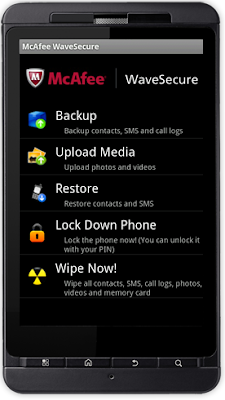
McAfee WaveSecure is a complete mobile security service for your Google Android, BlackBerry, Symbian and Microsoft Windows Mobile. McAfee WaveSecure secures your mobile device and personal data in the event of loss or theft by allowing you to locate/track your device, helps prevent device misuse, and remotely locks your device and wipes your data. It enables you to back up and restore your data from the device or via an easy-to-use web portal.

McAfee WaveSecure runs on major mobile phone platforms including Google Android, BlackBerry, Symbian and Microsoft Windows Mobile. If you don't have a smartphone, McAfee WaveSecure Backup is available for phones that run Java.

McAfee WaveSecure - Complete mobile security service for your Google Android, BlackBerry, Symbian and Microsoft Windows Mobile

McAfee WaveSecure Key Features :
  • Lock and Wipe - Remotely lock down your device, wipe out important data stored on your mobile to protect your privacy 
  • Backup and Restore - Back up your data from your phone or remotely on the web. Access your data online from anywhere. Restore your data to a new phone 
  • Location and SIM Tracking - Locate your lost phone and plot the locations on a map. Track SIM cards inserted and phone calls made to help get your lost phone back
Download McAfee WaveSecure for your Google Android, BlackBerry, Symbian and Microsoft Windows Mobile from link below :
web developer

Wednesday, March 30, 2011

Adobe Flash 10.2 for Android

Adobe has finally released a new Flash Player 10.2 for Google’s Android based smartphones. The new Adobe Flash Player 10.2 version brings full web experience with videos, games, apps and mobile web browsers. Flash 10.2 also brings extended battery life for all devices with Android. This release is available for Android 2.2 (Froyo) and 2.3 (Gingerbread) devices which meet the Flash Player hardware system requirements.

Adobe Flash 10.2 for Android

Here is the Improvements:
  • Performance enhancements to take advantage of new hardware in both Android 3.x tablets, as well as existing hardware in many Android 2.2 and 2.3 devices.
  • Tight integration with the new Android 3.x browser to treat Flash content as part of the web page instead of as a separate “overlay.” This results in improved scrolling of web pages and the ability to display pages in the way intended by the page designer, including new support for compositing HTML and other web content over Flash Player rendered content.
  • Automatic soft keyboard support to simplify text entry for rich mobile and multi-screen experiences.
To see if your device is certified for Flash Player 10.2, visit web developer

Saturday, February 19, 2011

TeamViewer 6 for Apple iOS and Android - Free Remote Desktop Sharing for Apple iOS and Android

TeamViewer is one of the most know applications we can use to access computers remotely, their free version is quite complete and with no complexity for installing nor using it. The mobile versions represent a great tool if we need some quick access to remote machines, that’s why they’ve developed the apps for iPhone, iPad and now Android (beta).

With the TeamViewer app for Apple iOS and for Android you are able to access remote computers from everywhere. It allows you to give spontaneous support as well as having permanent access to unattended computers.

TeamViewer 6 for Apple iOS and Android

Here are some features of  TeamViewer 6 for Apple iOS and Android :
  • Remotely access unattended computers
  • Conveniently control remote computers using the iPhone multi-touch gestures: left click, right click, drag & drop, scroll wheel, zoom, change monitor
  • Complete keyboard control incl. special keys such as Ctrl, Alt, Windows®
  • Remotely reboot the computer
  • Automatically adjust the screen resolution of the remote computer
  • Overview of computers that are online via the integrated Partner list
  • Effortlessly access computers behind firewalls and proxy servers
  • Meets highest security standards: 256 Bit AES Session Encoding, 1024 Bit RSA Key Exchange
The Free version of TeamViewer has exactly the same features as the Pro version. However, the license of the Free version is intended for private use only
Download TeamViewer 6 for Apple iOS and Android from link below :

Friday, February 18, 2011

TWIDROYD - The Premium Twitter Client For Android

Twidroyd is a fully featured twitter client, including postings, mentions, direct messages with threaded view, integrated search, list viewing, url shortening, geo-location support, multi-language interface, background notifications and more.

TWIDROYD - The Premium Twitter Client For Android

Turning your device into landscape mode automatically opens the LivePreview mode, which displays linked web pages and media right alongside the tweet. no need to open a browser and toggle between windows to fully engage in the content. reading your tweets suddenly becomes far more efficient – and fun!

Twidroyd has native bit.ly support for url shortening and fully integrates twitlonger for tweets containing more than 140 characters and plixi, for embedding photos within tweets. through services like twitpic, photos will appear right in your tweet stream.

Download Twidroyd for android 1.5 from link here

Tuesday, February 8, 2011

Rove Mobile Admin v6.0 - Enabled Client for the Rove Mobile Admin mobile IT Management Solution

The Rove Mobile Admin Client is a smartphone- and tablet-enabled client for the Rove Mobile Admin mobile IT management solution. Rove Mobile Admin is a highly secure client-server solution that allows you to monitor and manage your IT environment from your smartphone or tablet. Once the Rove Mobile Admin Client software is installed on your device, you can connect through your Rove Mobile Admin Server installed behind your corporate firewall to receive real-time alerts to IT issues and access the servers and systems on your network that you want to manage.

Rove Mobile Admin v6.0 - Enabled Client for the Rove Mobile Admin mobile IT Management Solution

Rove Mobile Admin v6.0 Key Features :
  • Rove Mobile Admin gives access to many systems and services, including:
  • Real-time Dashboard - alerts from the following monitoring and incident management systems: Microsoft System Center Operations Manager, BMC Performance Manager Portal, Nagios Monitoring, BMC Remedy Service Desk, CA Service Desk
  • Monitoring: Microsoft System Center Operations Manager, BMC Performance Manager Portal, Nagios Monitoring
  • Virtualization: VMware Infrastructure, Microsoft Hyper-V
  • Incident Management: BMC Remedy Service Desk, CA Service Desk
  • Remote Access: RDP and VNC, SSH and Telnet, HP iLO
  • Mail: Microsoft Exchange, Domino
  • Windows: Command Prompt, Event Viewer, Local Users and Groups, File Explorer, Printers, Restart, Scheduled Tasks, Shared Folders, Services, System Information, Task Manager, Terminal Services, PowerShell, Dial-up Connections
  • Mobile Device Administration: BES, Microsoft System Center Mobile Device Manager
  • Directory Services: Active Directory, Novell Console.
Download Rove Mobile Admin v6.0 from link below :
web developer

Tuesday, January 11, 2011

Free Lookout Mobile Security for Android 5.1

Antivirus prevention isn't anywhere near as necessary for Android devices as it is for Windows computers just yet. As Android's market share grows, though, so will the attacks. More importantly for the here and now, Lookout Mobile Security provides key security options that are unique to the mobile market. Along with the antivirus and anti-malware tech, there's a lost and stolen phone locator service, an application privacy adviser, and a backup service.

Lookout Mobile Security for Android 5.1

Lookout Mobile Security includes:

Anti-Virus and Security
  • Block viruses, malware and spyware
  • Scan every app you download
  • Get virus protection against the latest threats with automatic antivirus updates
Find My Phone
  • Now you never have to ask the question, “Where’s my Droid?”
  • Find your lost or stolen phone by locating it on a map
  • Activate a loud alarm to find your phone nearby, even if it is on silent or vibrate
  • Lookout can remotely turn on GPS, so you can find your phone even if GPS is turned off
  • Log-in to myLookout.com from any web browser to quickly find your phone (even if GPS is off) with the best free Find My Phone app, as seen on TV!
Backup and Restore
  • Securely back up your contacts to the web
  • Restore contacts to an existing phone
  • Access all your backup data securely online at myLookout.com
  • Lookout is certified by TRUSTe so you can rest assured your privacy and your data is protected
Lookout's interface is helpfully simple to navigate. At the top right of the app, a status notification tells you if you've got security problems or if, "Everything is OK." Below that, the four main features are presented as buttons. Tap one to reveal a button that will run the feature, if it's the Security scan, the Privacy scan, or the Backup.

The Missing Phone option is less intuitive. It merely tells you to go to myLookout.com to locate, lock, scream, or wipe your phone. The scream option sets off a high-pitched alarm to annoy phone thieves and alert others. Of course, you're not going to require any of those options if you know where your phone is. But it's a good reminder that the feature is there, even if it's only for Web use.

You can access Lookout from the app or a notification bar icon that also informs you of your status. The Settings hardware button reveals a reasonable although not robust selection of options to configure, presented in the standard and familiar Android style.

Installation
Lookout's installation is smooth and simple. The free account registration requires a valid e-mail address, which is important because several of the app's features require communication with the user.

As a security app, it's not surprising that Lookout will grab with some fairly deep hooks into your Android device. Lookout has permission rights to your personal information, messages, location, network communication, accounts, storage, phone calls, hardware controls, and system tools. Download Lookout Mobile Security for Android 5.1 from link below :
web developer